TRADING JOURNAL • GOOGLE SHEETS + WEB APP

Stop guessing.Grow from real data.

Truth Journal helps you record, analyse, and review every trade systematically—so you can see the strengths, mistakes, and behaviours shaping your results.

Available in English and Thai • Runs through your own Google account
Truth Journal English dashboard
Win Rate57.69%
Profit Factor1.87
Google SheetsYour data, your account
Web AppAccess it anywhere
MT5 ImportSpend less time logging
TH / ENTwo language editions
Dark / LightChoose your preferred mode

WHAT TRADERS OFTEN FAIL TO SEE

Results reveal more than profit or loss

When your records are scattered, you see the final number but not the reasons behind it. Truth Journal brings every important dimension together in one place.

01

The details fade

You may forget which trades followed the plan, which were driven by emotion, and which sessions produced your best results.

02

Performance stays vague

Net profit alone cannot show drawdown, expectancy, profit factor, win rate, or the consistency of your process.

03

The same mistakes repeat

Without evidence to review, decisions are based on memory and feeling instead of reliable trading data.

EVERYTHING YOU NEED TO IMPROVE

Turn every recorded trade into a clearer decision

See your portfolio at a glance
See the full picture

SMART DASHBOARD

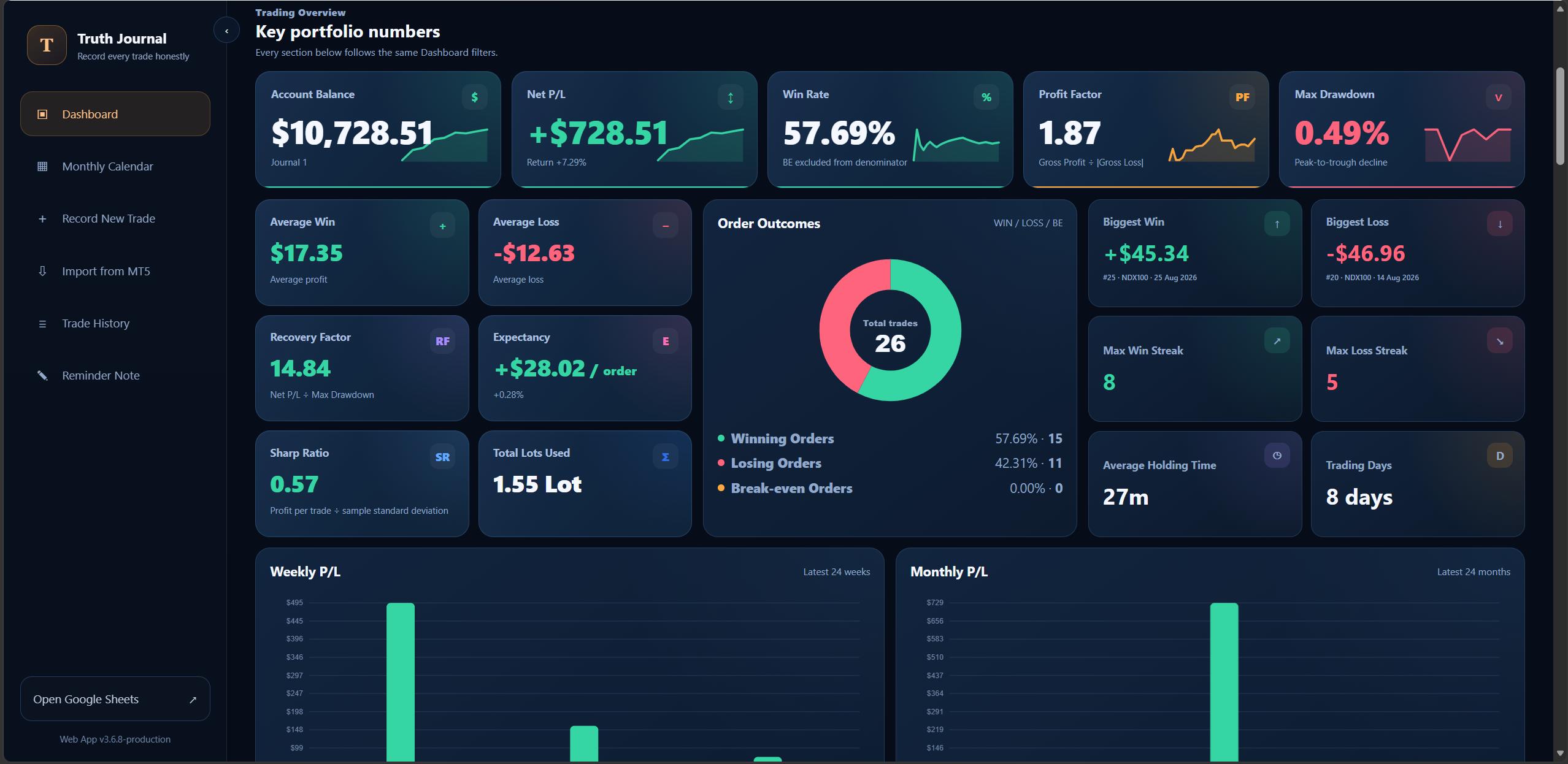
See your portfolio at a glance

The numbers that matter stay together in one clear view—from Balance and Net P/L to Win Rate and Profit Factor.
  • Balance, Net P/L, Win Rate, and Profit Factor
  • Max Drawdown, Recovery Factor, and Sharpe Ratio
  • Expectancy, Average Win/Loss, and Average Holding Time
  • WIN / LOSS / Break-even outcome chart
Plan profit and control risk over time
Dark mode

MONTHLY CALENDAR · DARK MODE

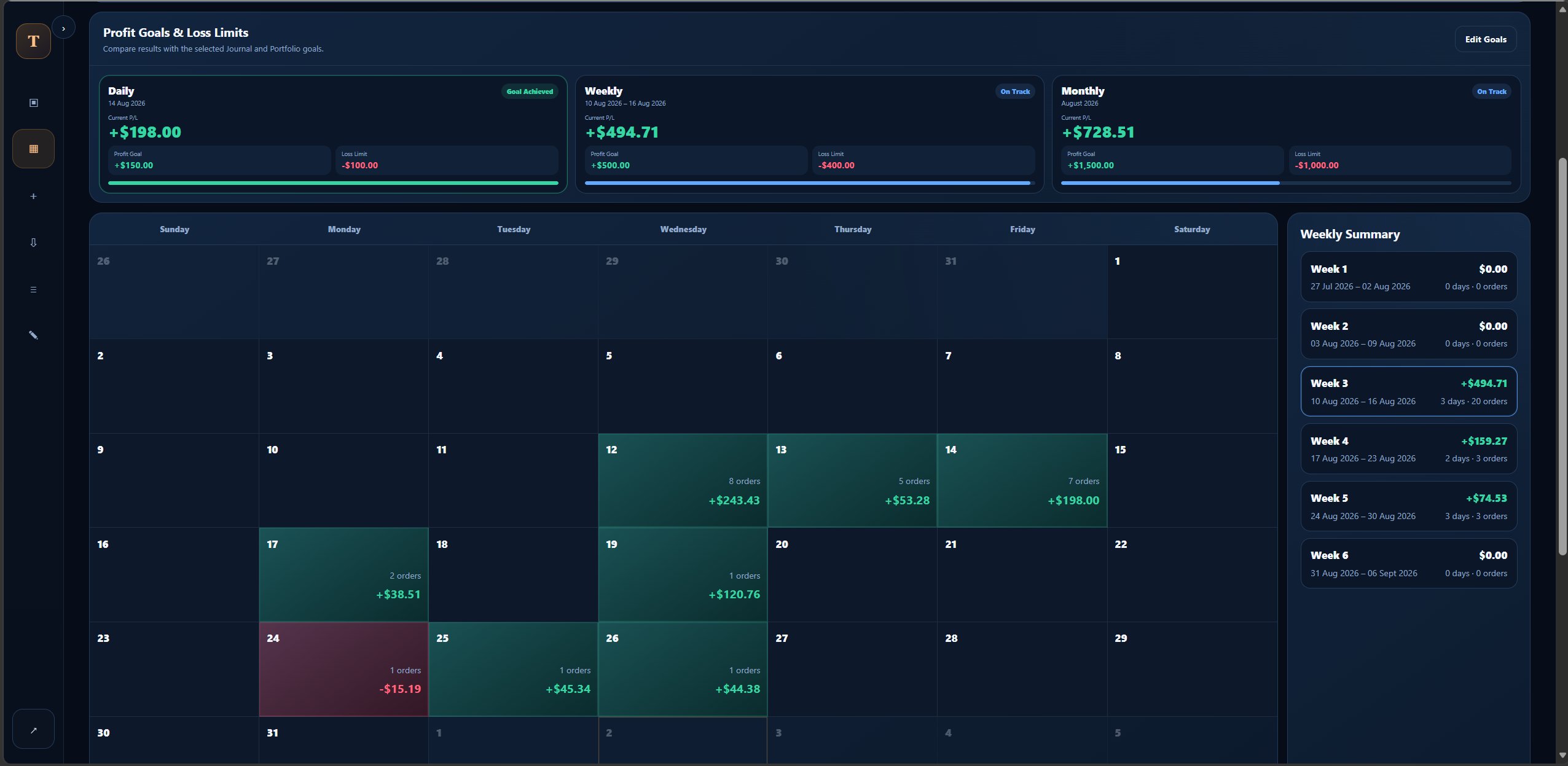
Plan profit and control risk over time

Set daily, weekly, and monthly goals and limits, then track the results on one calendar.
  • Daily, weekly, and monthly summaries
  • Editable Profit Goals and Loss Limits
  • Select a day or week to review the relevant results
  • Clear green and red performance backgrounds
Choose the view that feels right
Light mode

MONTHLY CALENDAR · LIGHT MODE

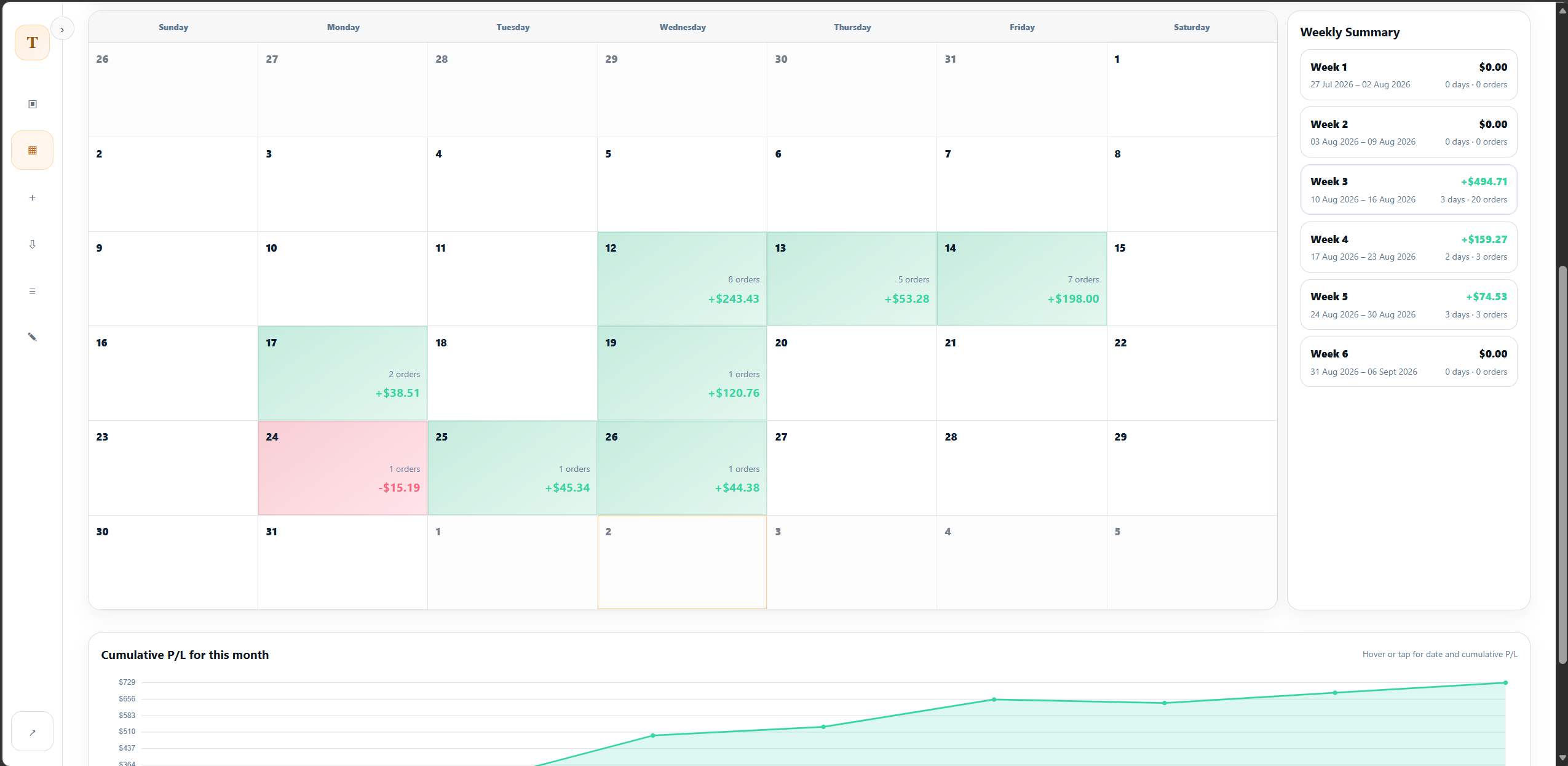
Choose the view that feels right

Switch between Dark and Light mode to suit your surroundings, with clear green and red performance colours.
  • Switch modes whenever you need to
  • Profit is green and loss is red
  • Keep goals and cumulative results easy to read
  • The image frame follows the screen's true ratio
Import MT5 history and reduce manual entry
Log trades faster

IMPORT FROM MT5

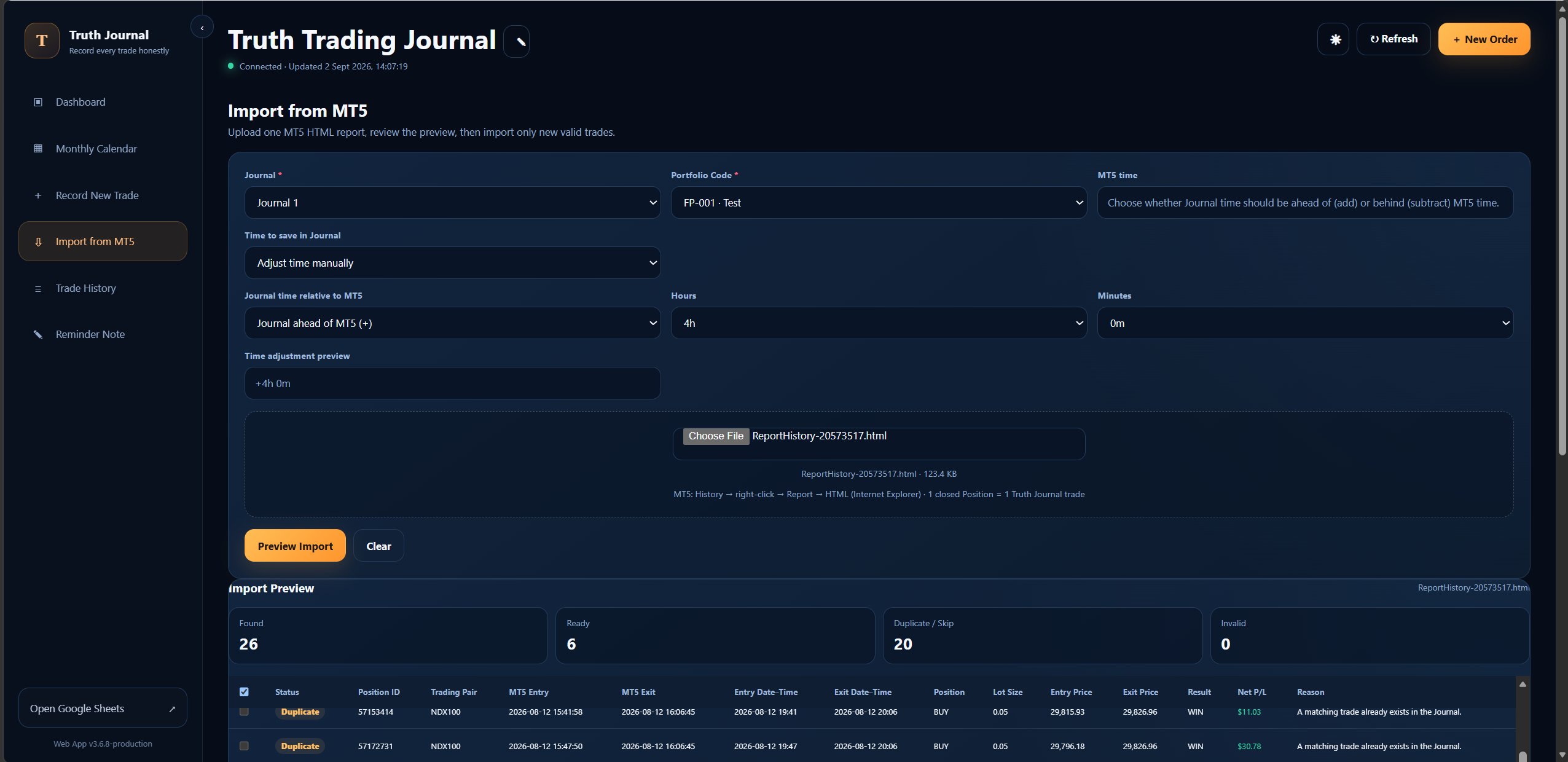
Import MT5 history and reduce manual entry

Bring in price, time, and results from MT5, then complete the review with your own notes.
  • Supports manual trade recording
  • Imports price, time, and trade result from MT5
  • Keeps the source time with adjustable offsets
  • Feeds directly into Dashboard and Analytics
Find what makes money—and what needs to stop
Reveal hidden patterns

DEEP ANALYTICS

Find what makes money—and what needs to stop

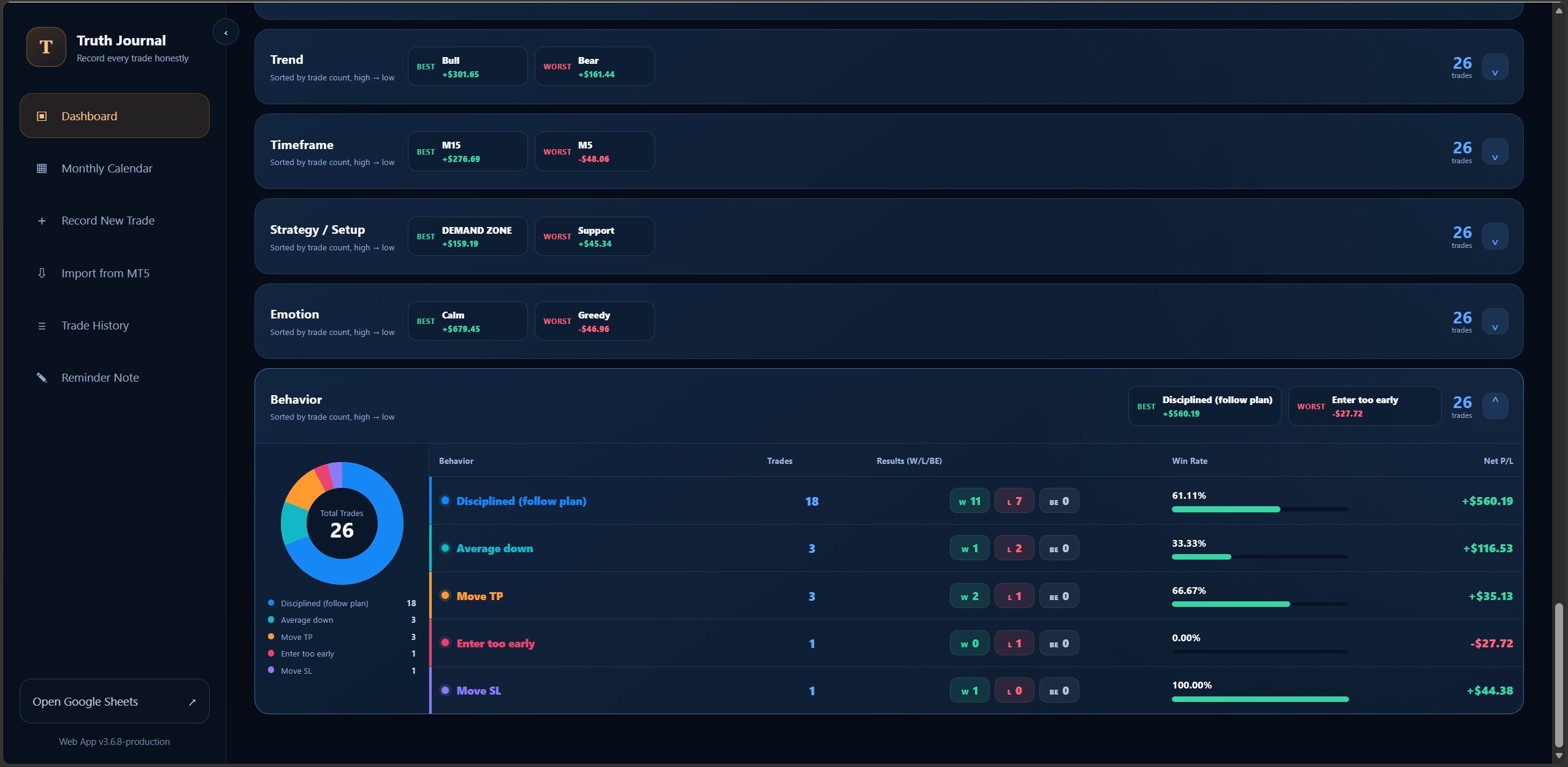
Compare eight dimensions using real data, ordered by trade count with Best and Worst results.
  • Trading Pair, Session, Setup, Trend, and Timeframe
  • Emotion, Behaviour, and Strategy / Setup
  • Trade count, Win/Loss/BE results, and Win Rate
  • Expand or hide every analysis section
Follow the portfolio journey
Track your progress

PORTFOLIO JOURNEY

Follow the portfolio journey

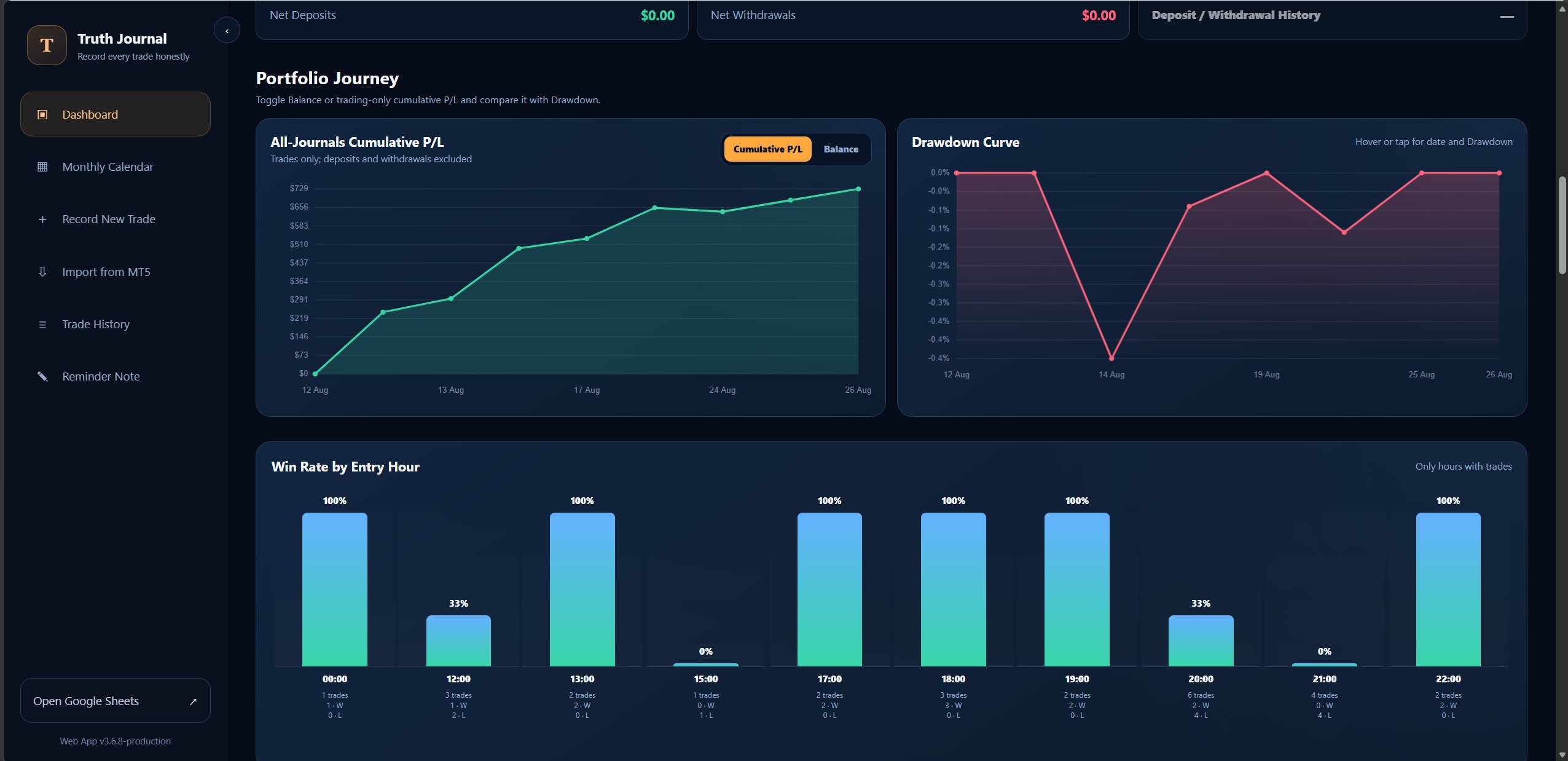
Track cumulative P/L, drawdown, and trading patterns through clear charts that show how your portfolio changes over time.
  • Cumulative P/L across all Journals
  • Compare Cumulative P/L with Drawdown
  • Win Rate by entry hour
  • Use real results to refine your process
Know which days fit your process
Plan from real data

WIN RATE BY WEEKDAY

Know which days fit your process

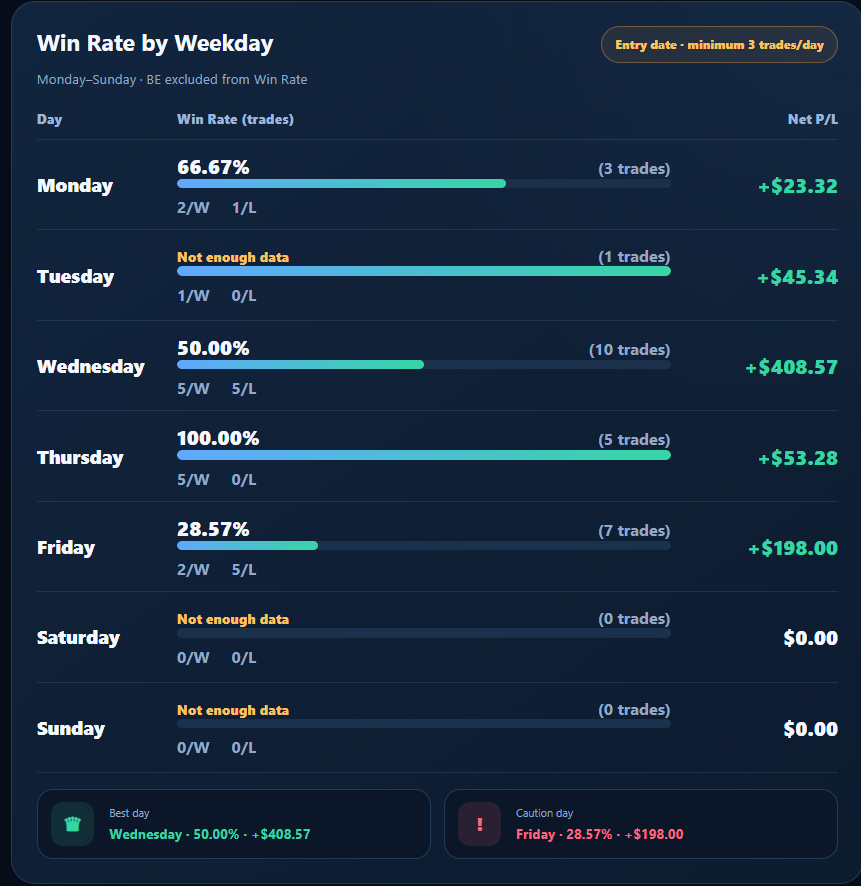
Compare Win Rate, trade count, and Net P/L by weekday so you can plan your trading time with more confidence.
  • Review Monday through Sunday
  • Separate Winning and Losing Orders
  • See when there is not enough data
  • Best day and Caution day at a glance
Keep every trade detail in one clear log
Keep data organised

TRADE LOG

Keep every trade detail in one clear log

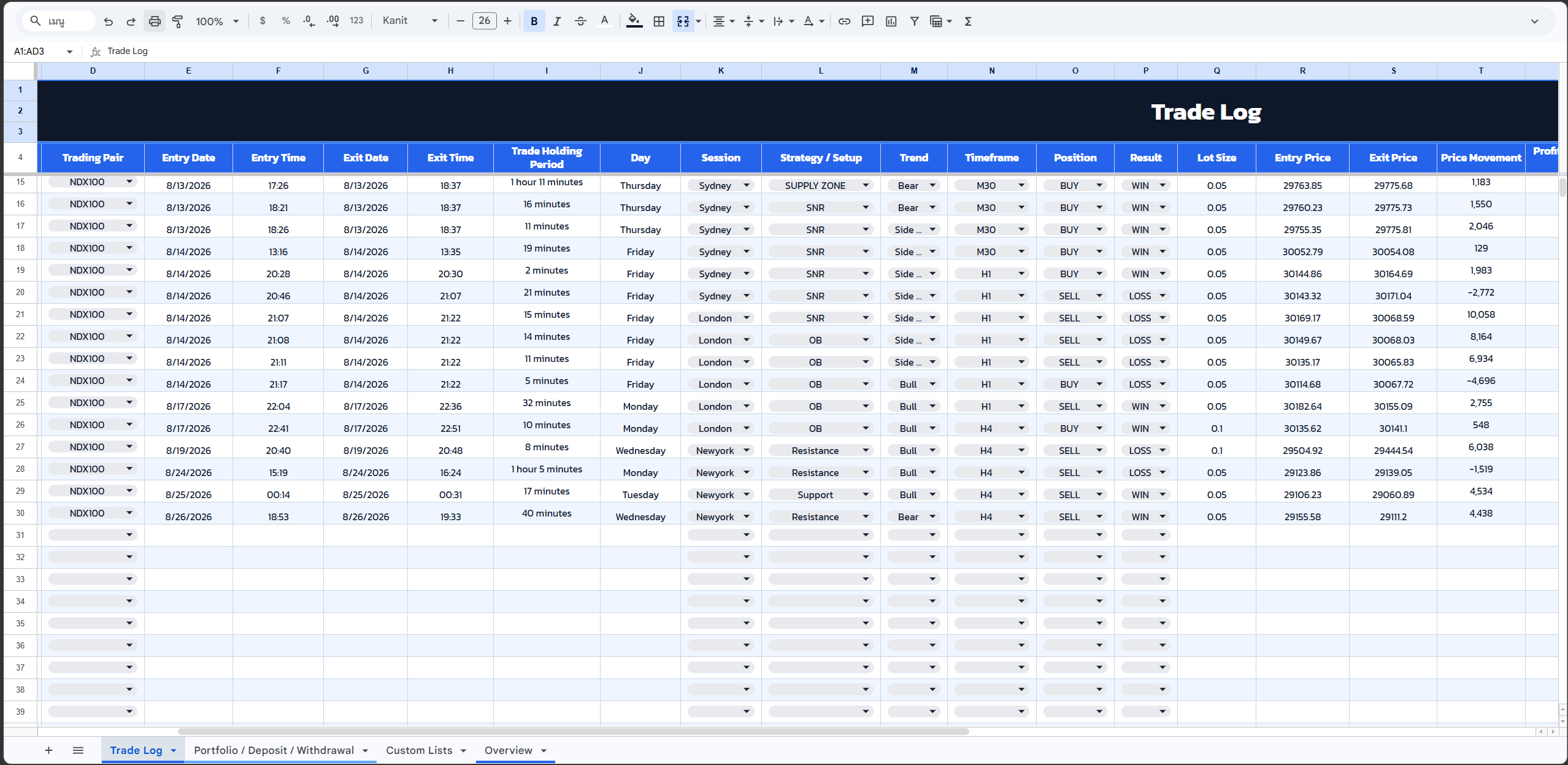
Store source data alongside your plan, strategy, emotion, and behaviour in one structured table for easy review.

  • Source price, time, and trade-result fields
  • Space for plan, strategy, emotion, and behaviour
  • The same data powers Dashboard and Analytics
  • Your file and trading data stay in your Google account
8deep-analysis categories
100portfolios per Journal
2language editions
1data space you control

YOUR TRADING DATA SHOULD STAY UNDER YOUR CONTROL

Built and operated inside the buyer’s Google account

The Google Sheets and Apps Script files you receive live in your own Google account. The seller cannot edit or delete your trading records.

Stored in your Google SheetsView, edit, and back up the Journal using your own account
The Web App runs from your filesDashboard data is read from the Journal you own
Licensing never deletes trade dataAccess validation is separate from the customer’s Journal records

GETTING STARTED

From receiving the files to opening your Web App in four steps

01

Receive Truth Journal

Choose the English or Thai edition and copy it into your Google account

02

Complete the first-time setup

Follow the guide to connect Google Sheets, Apps Script, and the Web App

03

Record or import MT5 trades

Add trades manually or import order history from MT5

04

Review and improve

Use Dashboard, Calendar, and Deep Analytics to refine your process with data

FAQ

Frequently asked questions

Do I need to install additional software?

No extra software is required for the Journal itself. The core system runs in Google Sheets and a Google Apps Script Web App through your browser.

Can I record trades manually and import from MT5?

Yes. Record trades manually or import from MT5, then add strategy, emotion, and behaviour details afterwards.

Can the seller see my trading data?

No. Your privacy matters. Your Journal data stays in Google Sheets under your Google account. The seller has no permission to view, edit, or delete your trading data.

How many Journals and portfolios are supported?

You can connect up to 10 Journals. Each Journal supports up to 3,000 trades and up to 100 portfolios per Journal.

Can I move a licence to another Gmail account?

A licence is linked to the first Gmail account that activates it. Contact the seller if the linked account must be changed.

EARLY ACCESS

One-time purchase. No monthly fees.

Truth Journal brings Google Sheets, Web App, MT5 Import, Dashboard, Calendar, and Deep Analytics into one package. You receive the files in your own Google account, can customize them, and keep control of your trading data.

More value without a recurring subscription

Some international trading-journal platforms charge around $15 per month on entry plans and up to about $99 per month on advanced plans.

*Public reference prices can change by plan or promotion; this is not a feature-for-feature comparison.
EARLY ACCESS · FIRST 50 LICENSES

Truth Trading Journal EN

$24Regular price $45

One-time purchase · no monthly fees

  • Google Sheets Trading Journal
  • Apps Script Web App
  • Import from MT5
  • Dashboard + Calendar + Deep Analytics
  • Setup and user guide
  • Your files and trading data stay in your Google account
  • Licence for one buyer account
Order / ContactGet details and payment instructions via LINE or Facebook

READY TO TURN JOURNALING INTO MEASURABLE IMPROVEMENT?

Record every trade honestly—and let the data tell the truth

Contact us for pricing, product details, and help getting started with Truth Journal.

Contact us directly through LINE or Facebook